Spring/JPA 심화
JPA 영속성 관리 (2편) : OSIV 패턴과 API 설계 전략
JuNo_12
2025. 6. 27. 13:53
전체 시리즈 목차
- 1편: N+1 문제 해결과 Fetch Join 전략
- 2편: OSIV 패턴과 API 설계 전략 ← 현재
- 3편: 영속성 컨텍스트와 엔티티 생명주기 관리
- 4편: 대용량 데이터 처리와 성능 최적화
1. OSIV(Open Session In View) 패턴 이해하기
OSIV란 무엇인가?
JPA에서는 OEIV(Open EntityManager In View)라고 하지만, 관례적으로 OSIV로 통일해서 사용합니다. Spring Boot에서는 기본적으로 활성화되어 있습니다.
# application.yml
spring:
  jpa:
    open-in-view: true  # 기본값: true
OSIV 동작 원리

OSIV의 장점:
- 복잡한 Fetch Join 전략 없이도 필요한 데이터에 접근 가능
- 컨트롤러 레벨에서 동적으로 데이터 로딩 제어
- LazyInitializationException 방지
2. API 설계와 엔티티 노출 전략
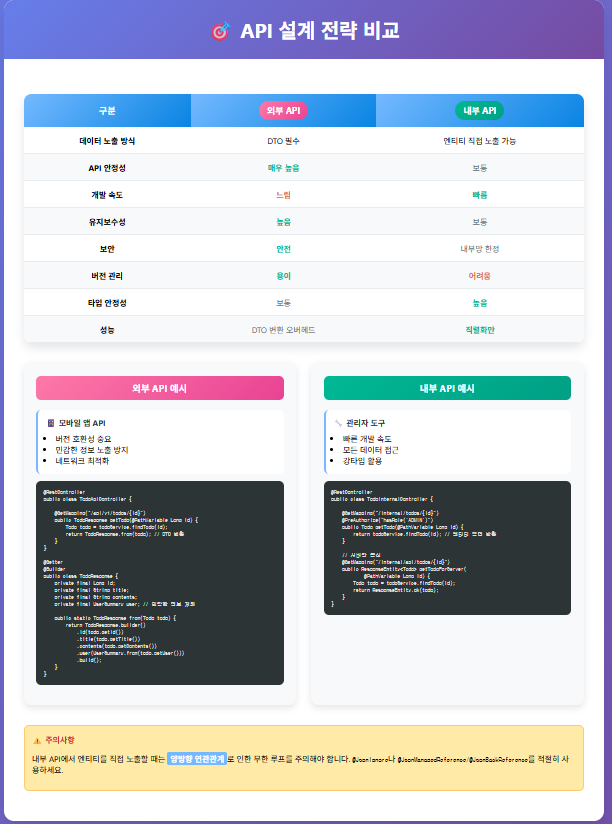
외부 API: DTO 필수 사용
외부 API에서는 반드시 DTO를 사용해야 합니다. 엔티티를 직접 노출하면 여러 문제가 발생합니다.
// ❌ 절대 하면 안 되는 예: 엔티티 직접 노출
@RestController
public class TodoApiController {

    @GetMapping("/api/v1/todos/{todoId}")
    public Todo getTodo(@PathVariable Long todoId) {
        return todoService.findTodo(todoId); // 위험한 방식!
    }
}
문제점:
- 엔티티 변경이 API 스펙에 직접 영향
- 민감한 정보 노출 위험 (password, 내부 ID 등)
- 무한 루프 가능성 (양방향 연관관계)
- API 버전 관리 어려움
올바른 외부 API 설계
// 외부 API용 Response DTO
@Getter
@Builder
public class TodoApiResponse {
    private final Long id;
    private final String title;
    private final String contents;
    private final String weather;
    private final UserSummary user;
    private final LocalDateTime createdAt;
    private final LocalDateTime modifiedAt;

    // 민감한 정보는 제외하고 필요한 정보만 포함
    @Getter
    @Builder
    public static class UserSummary {
        private final Long id;
        private final String username;
        // email, password 등은 제외

        public static UserSummary from(User user) {
            return UserSummary.builder()
                .id(user.getId())
                .username(user.getUserName())
                .build();
        }
    }

    public static TodoApiResponse from(Todo todo) {
        return TodoApiResponse.builder()
            .id(todo.getId())
            .title(todo.getTitle())
            .contents(todo.getContents())
            .weather(todo.getWeather())
            .user(UserSummary.from(todo.getUser()))
            .createdAt(todo.getCreatedAt())
            .modifiedAt(todo.getModifiedAt())
            .build();
    }
}

@RestController
@RequiredArgsConstructor
public class TodoApiController {

    private final TodoService todoService;

    @GetMapping("/api/v1/todos/{todoId}")
    public ResponseEntity<TodoApiResponse> getTodo(@PathVariable Long todoId) {
        Todo todo = todoService.findTodo(todoId);
        return ResponseEntity.ok(TodoApiResponse.from(todo));
    }

    // API 버전 관리도 용이
    @GetMapping("/api/v2/todos/{todoId}")
    public ResponseEntity<TodoApiV2Response> getTodoV2(@PathVariable Long todoId) {
        Todo todo = todoService.findTodo(todoId);
        return ResponseEntity.ok(TodoApiV2Response.from(todo)); // 다른 구조
    }
}
내부 API: 엔티티 직접 노출 가능
내부 API(관리자용, 서버간 통신)에서는 엔티티를 직접 노출할 수 있습니다.
// 내부 API에서는 엔티티 직접 사용 가능
@RestController
@RequiredArgsConstructor
public class TodoInternalController {

    private final TodoService todoService;

    // 관리자용 API
    @GetMapping("/internal/admin/todos/{todoId}")
    @PreAuthorize("hasRole('ADMIN')")
    public Todo getTodoForAdmin(@PathVariable Long todoId) {
        return todoService.findTodo(todoId); // 엔티티 직접 반환
    }

    // 서버간 통신용 API
    @GetMapping("/internal/api/todos/{todoId}")
    public ResponseEntity<Todo> getTodoForServer(@PathVariable Long todoId) {
        Todo todo = todoService.findTodo(todoId);
        return ResponseEntity.ok(todo);
    }
}
내부 API에서 엔티티 직접 노출이 가능한 이유:
- 서버와 클라이언트를 동시에 수정 가능
- 개발 속도 향상 (DTO 변환 로직 불필요)
- 강타입의 장점 활용 (컴파일 타임 체크)
- 보안 이슈 없음 (내부 네트워크)
API 설계 전략 비교
3. JSON 직렬화 문제 해결
양방향 연관관계 처리
엔티티를 직접 노출할 때 가장 큰 문제는 무한 루프입니다.
@Entity
public class Todo {

    @OneToMany(mappedBy = "todo")
    @JsonManagedReference // 순환 참조 방지
    private List<Comment> comments = new ArrayList<>();
}

@Entity
public class Comment {

    @ManyToOne(fetch = FetchType.LAZY)
    @JoinColumn(name = "todo_id")
    @JsonBackReference // 순환 참조 방지
    private Todo todo;
}
실무에서 권장하는 패턴
// 엔티티에는 최소한의 JSON 설정만 적용
@Entity
public class User {

    private Long id;
    private String userName;
    private String email;

    @JsonIgnore // 민감한 정보는 숨김
    private String password;

    @OneToMany(mappedBy = "user")
    @JsonIgnore // 복잡한 연관관계는 숨김
    private List<Todo> todos = new ArrayList<>();
}

// 복잡한 구조가 필요한 경우는 별도 DTO 사용
@Getter
@Builder
public class UserDetailResponse {
    private final Long id;
    private final String userName;
    private final String email;
    private final List<TodoSummary> recentTodos; // 필요한 정보만 포함

    public static UserDetailResponse from(User user) {
        return UserDetailResponse.builder()
            .id(user.getId())
            .userName(user.getUserName())
            .email(user.getEmail())
            .recentTodos(user.getTodos().stream()
                .limit(5) // 최근 5개만
                .map(TodoSummary::from)
                .toList())
            .build();
    }
}
4. 읽기 전용 트랜잭션 최적화
@Transactional(readOnly = true) 활용
OSIV 환경에서는 읽기 전용 트랜잭션을 적극 활용해야 합니다.
@Service
@Transactional(readOnly = true) // 클래스 레벨에 기본 적용
public class TodoService {

    private final TodoRepository todoRepository;

    // 조회 메서드들은 자동으로 readOnly = true
    public Todo findTodo(Long todoId) {
        return todoRepository.findByIdWithUser(todoId)
            .orElseThrow(() -> new InvalidRequestException("Todo not found"));
    }

    public Page<Todo> findTodos(int page, int size, String weather,
                               LocalDateTime startDate, LocalDateTime endDate) {
        Pageable pageable = PageRequest.of(page - 1, size);

        if (weather != null && startDate != null && endDate != null) {
            return todoRepository.findByWeatherAndModifiedAtBetweenOrderByModifiedAtDesc(
                weather, startDate, endDate, pageable);
        } else if (startDate != null && endDate != null) {
            return todoRepository.findByModifiedAtBetweenOrderByModifiedAtDesc(
                startDate, endDate, pageable);
        } else if (weather != null) {
            return todoRepository.findByWeatherOrderByModifiedAtDesc(weather, pageable);
        } else {
            return todoRepository.findAllByOrderByModifiedAtDesc(pageable);
        }
    }

    // 쓰기 작업은 명시적으로 readOnly = false (기본값)
    @Transactional
    public TodoSaveResponse saveTodo(AuthUser authUser, TodoSaveRequest request) {
        User user = User.fromAuthUser(authUser);
        String weather = weatherClient.getTodayWeather();

        Todo newTodo = new Todo(request.getTitle(), request.getContents(), weather, user);
        Todo savedTodo = todoRepository.save(newTodo);

        return new TodoSaveResponse(
            savedTodo.getId(),
            savedTodo.getTitle(),
            savedTodo.getContents(),
            weather,
            new UserResponse(user.getId(), user.getUserName(), user.getEmail())
        );
    }
}
읽기 전용 트랜잭션의 최적화 효과:
- 플러시 모드가 MANUAL로 설정: 불필요한 flush 방지
- 더티 체킹 비활성화: 변경 감지 오버헤드 제거
- 데이터베이스 최적화: 일부 DB는 읽기 전용 쿼리를 다르게 처리
- 커넥션 풀 최적화: 읽기 전용 커넥션 풀 활용 가능
5. OSIV 성능 모니터링과 튜닝
커넥션 풀 모니터링
# application.yml - 커넥션 풀 설정
spring:
  datasource:
    hikari:
      maximum-pool-size: 20
      minimum-idle: 5
      connection-timeout: 20000
      idle-timeout: 300000
      max-lifetime: 1200000

# 모니터링 설정
management:
  endpoints:
    web:
      exposure:
        include: health, metrics, hikaricp
  metrics:
    enable:
      hikaricp: true
OSIV 성능 튜닝 가이드
// 1. 지연 로딩 최적화
@RestController
public class OptimizedTodoController {

    @GetMapping("/todos/{todoId}")
    public ResponseEntity<TodoResponse> getTodo(
            @PathVariable Long todoId,
            @RequestParam(defaultValue = "false") boolean includeComments) {

        Todo todo = todoService.findTodo(todoId);

        TodoResponse.Builder builder = TodoResponse.builder()
            .id(todo.getId())
            .title(todo.getTitle())
            .user(UserResponse.from(todo.getUser()));

        // 필요한 경우에만 지연 로딩 실행
        if (includeComments) {
            builder.comments(todo.getComments().stream()
                .map(CommentResponse::from)
                .toList());
        }

        return ResponseEntity.ok(builder.build());
    }
}

// 2. 배치 로딩 설정
@Entity
public class Todo {

    @OneToMany(mappedBy = "todo")
    @BatchSize(size = 100) // 배치로 로딩하여 N+1 문제 완화
    private List<Comment> comments = new ArrayList<>();
}

// 3. 쿼리 힌트 활용
@Repository
public interface TodoRepository extends JpaRepository<Todo, Long> {

    @QueryHints(@QueryHint(name = "org.hibernate.readOnly", value = "true"))
    @Query("SELECT t FROM Todo t WHERE t.user.id = :userId")
    List<Todo> findByUserIdReadOnly(@Param("userId") Long userId);
}
핵심 요약
OSIV 패턴 활용 원칙
- OSIV는 개발 편의성을 크게 향상시킨다
- 뷰 레이어에서 자유로운 지연 로딩
- LazyInitializationException 방지
- 복잡한 Fetch Join 전략 완화
- 읽기 전용 트랜잭션을 적극 활용하라
- @Transactional(readOnly = true)로 성능 최적화
- 플러시 모드 최적화와 더티 체킹 비활성화
- 20% 이상의 성능 향상 가능
- 커넥션 리소스 관리에 주의하라
- 대용량 트래픽에서 커넥션 풀 고갈 위험
- 적절한 커넥션 풀 크기 설정
- 성능 모니터링 필수
API 설계 전략
- 외부 API는 반드시 DTO 사용
- 엔티티 변경으로부터 API 보호
- 민감한 정보 노출 방지
- API 버전 관리 용이
- 내부 API는 엔티티 직접 노출 가능
- 빠른 개발 속도
- 강타입의 장점 활용
- 동시 수정 가능한 환경에서 유리
- JSON 직렬화 이슈 해결
- 양방향 연관관계 순환 참조 방지
- @JsonIgnore, @JsonManagedReference 활용
- 복잡한 구조는 별도 DTO 사용
다음 편 예고: 3편에서는 영속성 컨텍스트의 생명주기 관리와 엔티티 생명주기 이벤트 처리에 대해 다루겠습니다. 특히 같은 트랜잭션 내에서의 동일성 보장과 컬렉션 매핑 최적화 기법을 자세히 알아보겠습니다.